
The Skate Card

The Skate Card

Skate Card, Mongolia’s first wearable payment card, is offered to customers aged 7 and above. The Skate Card is a skateboard shaped wearable device embedded with bank card information, allowing users to make contactless payments at all POS terminals and shop online.
Time
4 years
Currency
MNT
Available for customers aged 7 and above
Limited edition
NFC technology
Earn 10%–20% cashback by tapping the card at partner merchants
Usable worldwide for payments
Exclusive discounts and special promotions
  • Card brand UnionPay
    Type International
    Validity 4 years
    Currency MNT
    Account opening Free
    Minimum account balance 0 MNT
    Card issuance fee MNT 150,000
    Account maintenance fee Free
    Daily cash withdrawal limit Not supported (cannot be used at ATM)
    Daily non‑cash transaction limit MNT 1,000,000
    Contactless consecutive transaction limit MNT 500,000
    Contactless limit note If the limit is reached, transactions can be continued by selecting “Reset Contactless Limit” via egolomt.mn
    Balance enquiry Not supported (cannot be used at ATM)
    Cash withdrawal Not supported (cannot be used at ATM)
    Transfer to foreign financial institutions 1.5% (minimum MNT 3,000)
    PIN code issuance Free via Internet banking or Smart banking
    Card replacement MNT 150,000
    Urgent card issuance fee MNT 10,000
    • As transactions are made contactlessly only, once the contactless transaction limit of MNT 500,000 is reached, users can continue transactions by selecting “Reset Contactless Limit” on egolomt.mn.
    • Card details can be viewed by entering the 3‑digit CVN code in the SocialPay Junior App.
    • For children aged 7–13 and 14–17, the Skate Card information is visible in the parent’s Internet Banking. Parents can manage their child’s Skate Card through Internet Banking and Smart Banking.
    • First Transaction Promotion: M Book coupon
    • Loyalty Program: Gen Z Loyalty – double rewards
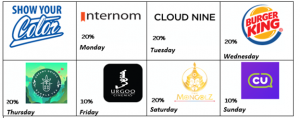
    • 7 Days, 7 Different Promotion
  • For New Card Application and Card Renewal

    • For customers aged 7–17, a legal guardian may submit the application by visiting any branch with their electronic national ID card and the child’s birth certificate.
    • For customers aged 18–22, an electronic national ID card is required.
    • The cardholder must review and sign the agreement concluded between the bank and the cardholder.

    For Card Replacement

    • Electronic national ID card is required.
    • How many days does it take to issue a new card?

      If ordered at a branch:

      • Ulaanbaatar branches: within 2 business days.

      • Local branches: within 5–10 business days.

    • How long does it take for a card ordered with delivery to arrive?

      With delivery:

      • Ulaanbaatar: delivery to your address within 2–5 business days.

      • Local areas: delivery to your address within 5–10 business days.

    • Is urgent card issuance available? How long does it take?

      Yes. Urgent card issuance can be requested on business days from 09:00–16:00 through:

      • Internet Banking: www.egolomt.mn

      • Golomt Bank mobile application

      • cards.golomtbank.com website

      • Any nearby Golomt Bank branch

      Note: The card will be printed 1 hour after submitting the request. Please collect the card by visiting the Sansar Business Center branch with your national ID card or foreign passport. Urgent card issuance is not available in local areas.

    • How can I recover my PIN code if I forget it?

      If you forget your PIN code, log in to the Golomt Bank mobile app or www.egolomt.mn, go to SERVICES → CARD, select the card, and click “Change Card PIN Code.” A one time verification code will be sent to your registered phone number or email. After verification, a new PIN code will be automatically generated and displayed.

    • What should I do if my card is blocked after entering the PIN incorrectly three times?

      Log in to www.egolomt.mn, go to CARD → CARD LIST, select the card, and click “Unblock Card PIN.” If you do not manually unblock it, the PIN block will be automatically removed after 24 hours.

    • What should I do if my card is lost or stolen?

      Immediately contact the Customer Service Center at 1800 1646 or send a request to mail@golomtbank.com to block the card. You can also deactivate the card via www.egolomt.mn or the Golomt Bank mobile app, with the option to reactivate it later.

    • How can I find my card’s CVV code?

      The 3 digit number on the back of the card is the card’s CVV code.

    • How can I check my card balance?

      You can check your balance using the following channels:

      • Easy Info (receive account transaction notifications on your phone)

      • Internet Banking (www.egolomt.mn) or the Golomt Bank mobile app

      • Mobile banking by dialing *1646#

      • At an ATM using your card

    • Can the Color Card be ordered online?

      Yes. A legal guardian can log in to www.egolomt.mn using their Internet Banking credentials and order a Color Card.

    • What should I do if my card is captured by a Golomt Bank ATM?

      • If captured at a branch ATM: Present your identification to branch staff to retrieve your card.

      • If captured at an ATM located at a merchant or outdoors: Contact the Customer Service Center at 1800 1646 or email mail@golomtbank.com. The card will be delivered to the nearest branch within 2–3 business days after submitting the request.

This website uses google analytics

This website uses information gathering tool which is Google analytic in order to determine the effectiveness of our online campaign in terms of sales and user activity on our sites.

  • 0
    100000000
    2000000000
    0
    20.8
    70
    0
    8
    30
    1
    12
    360

    Your loan calculation

    Monthly payment

    Salary amount (45%)


    Down payment

    Loan amount

  • 10000
    1000000
    2000000000
    0
    10000
    5000000
    1
    12.4
    30
    1
    12
    30

    Calculate your savings

    The money you saved

    Total interest

    Total

Exchange rate news